The run sheet

Sorted by where the driver actually is.

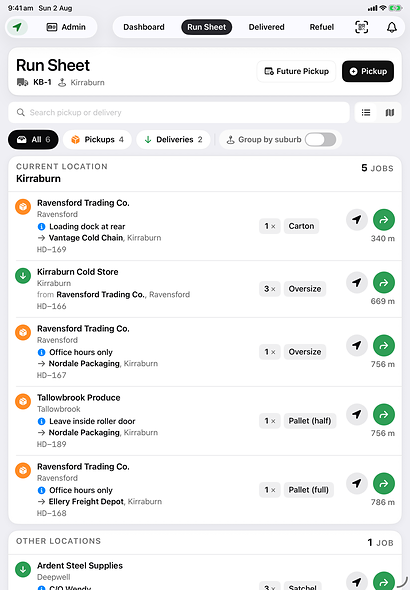
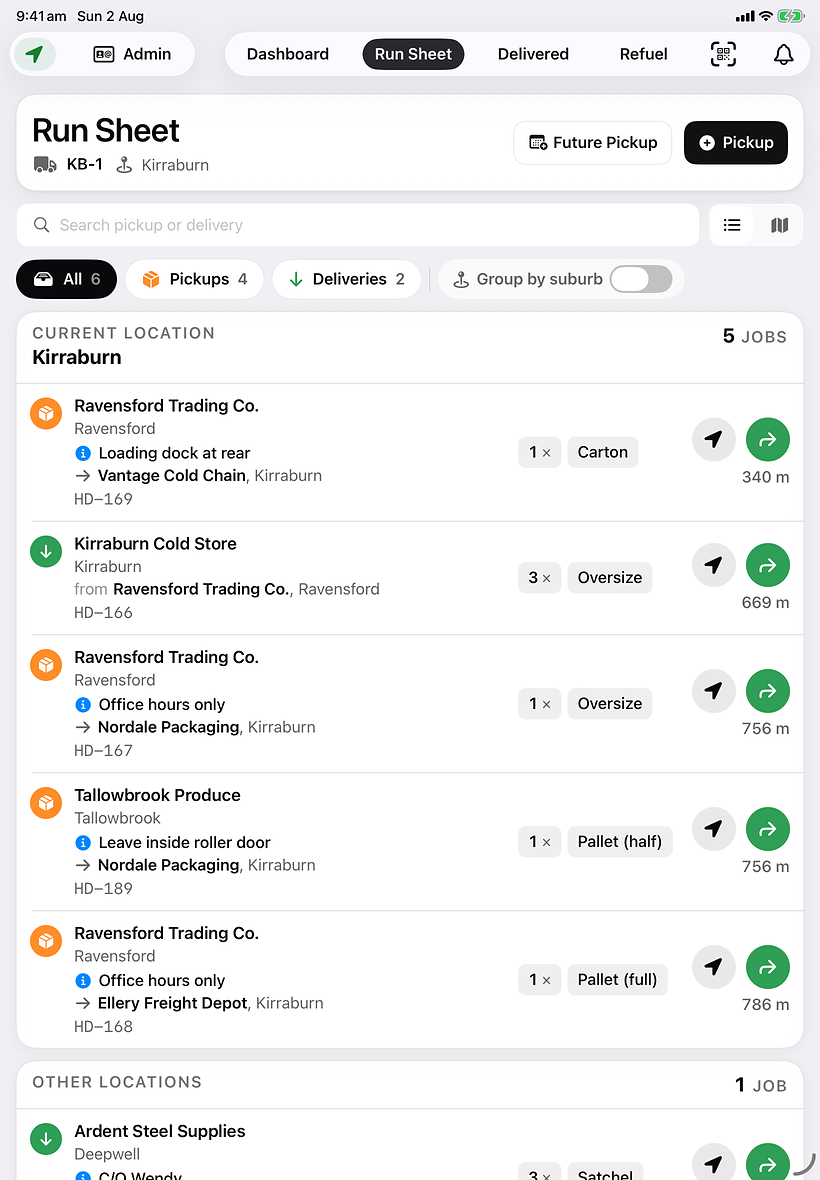
Today's jobs, nearest stops first, with real distances. One tap to navigate, one to mark it done.

5jobs in Kirraburn
340 mto the next stop

The office

Delivered today. Invoiced today.

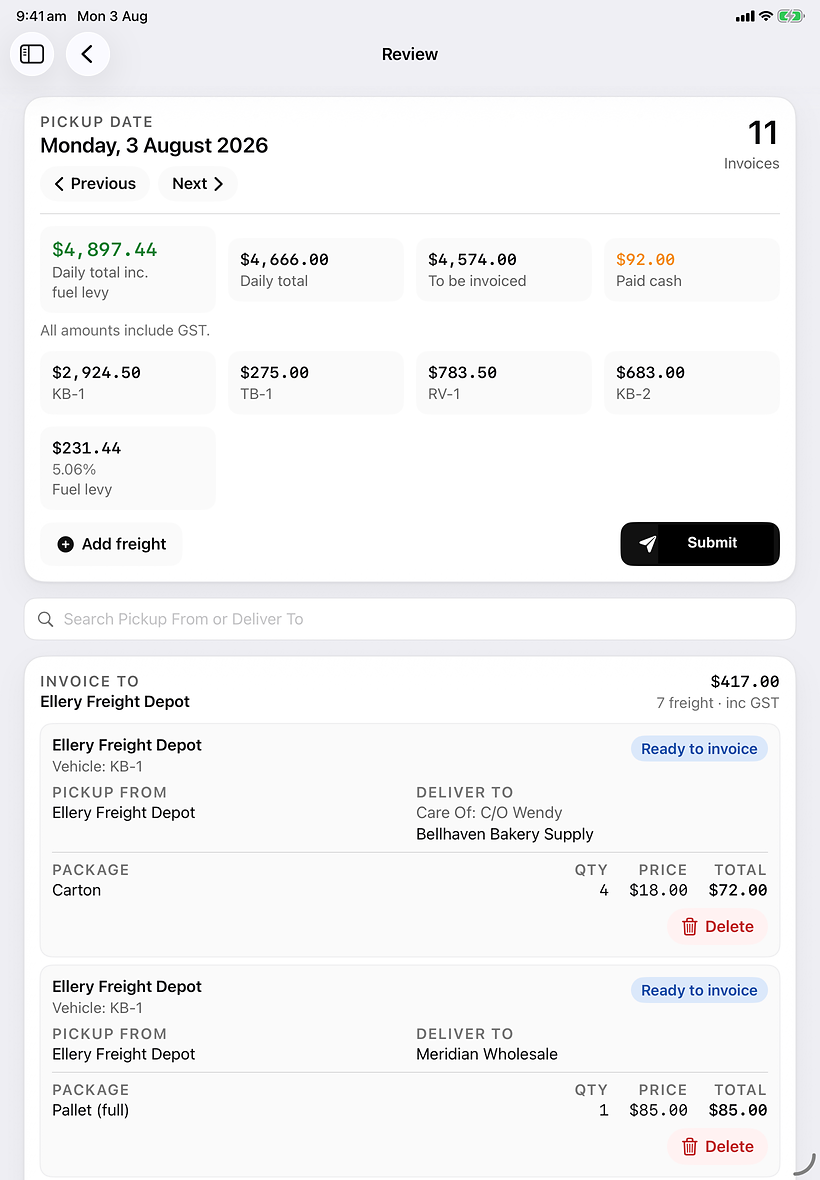
Every job arrives already priced. Review the day, submit it — no re-keying, no docket pile, no Saturday morning.

$4,666booked today
5.06%levy, from real refuels

Youalreadyhaveasystem.
It'sjustmadeofpaperandphonecallsNado.

The clipboardPrinted at 6am, out of date by 9.

“Where are you?”The only tracking you have is your own phone.

Saturday morningA pile of dockets and a few hours of typing.

Every vehicle, liveUpdating as they drive.

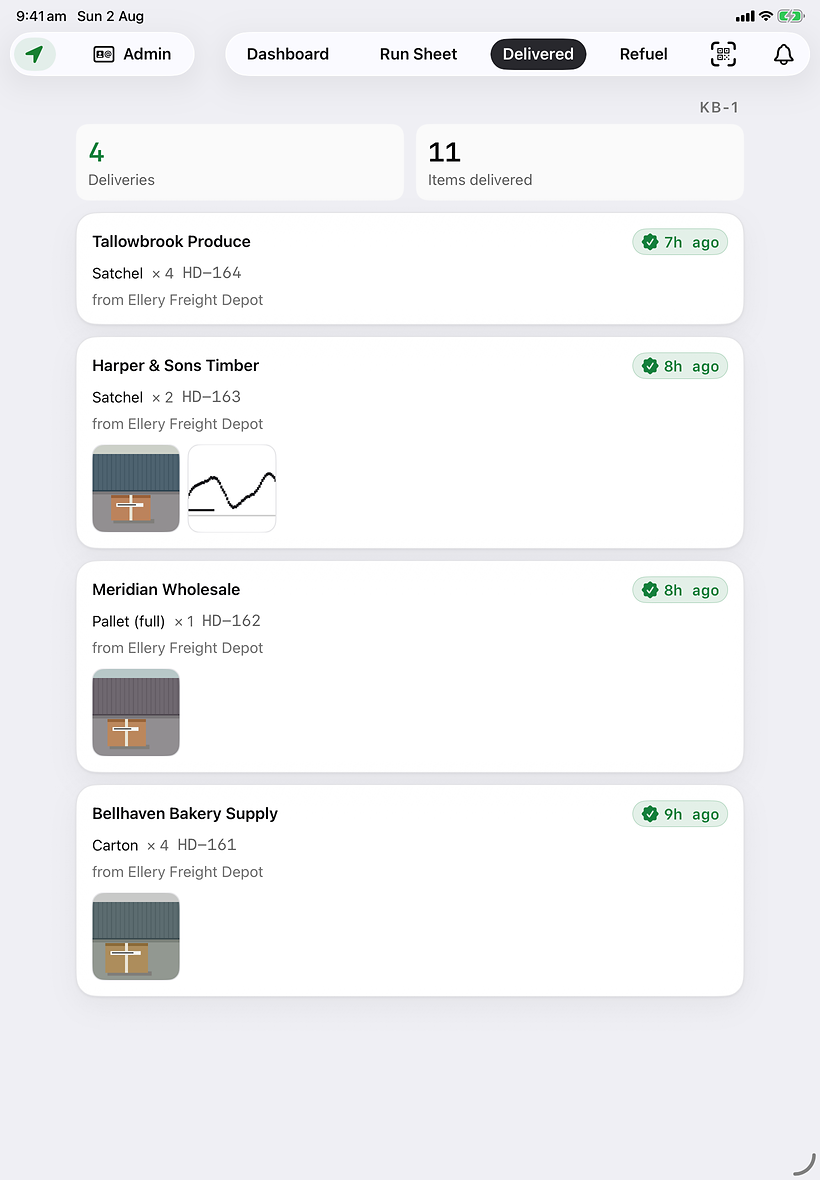
Every drop, provenPhoto and signature, attached to the job.

Every job, invoicedAlready priced. Review, then submit.
Nado

Freight, sorted.

Built for the device
iPad-native.
Built for the task.
In the vehicle
CarPlay. Live.
Turn-by-turn on the in-dash screen. Plug the phone in, it's on the dash.
Invoicing
Review. Submit.
Two steps at the end of the day. That's the whole job.

As fast as paper.

The clipboard gets an upgrade.

Drivers work the way they always have: the day in front of them, new pickups added as they come up, a line ticked off at every drop. Same order, same habits, same speed.

What’s different is knock-off. No more rewriting the day into invoices.
Every job priced itself as it happened. You review it, then submit it.

The Nado run sheet on an iPad, today’s deliveries grouped by suburb and ordered by distance.

Unexpected freight, added at the kerb.

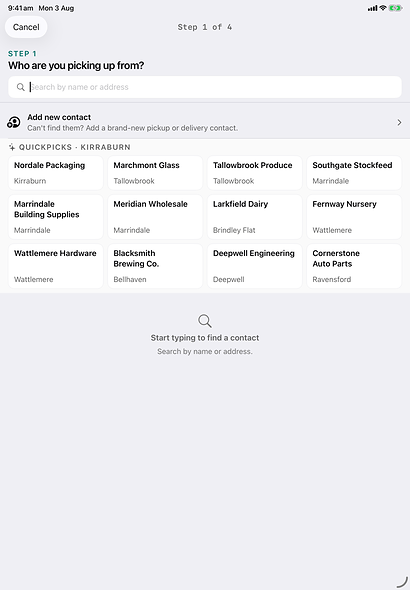
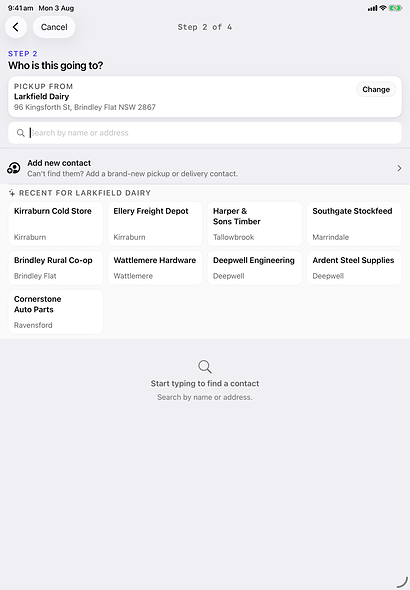
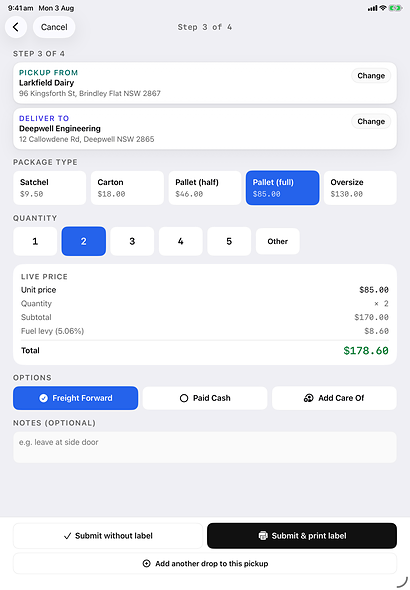
A customer hands over a package that isn’t on today’s run. Tap the contact, tap who it’s going to, select the package type and the quantity — the same details that would have gone on the clipboard. It’s priced as it’s written, and on the run sheet — not at the bottom of the page, in distance order.

Step 1 of the Nado Add Pickup wizard on an iPad: choosing who the freight is being picked up from, with a grid of quickpick contacts.
Step 2 of the Nado Add Pickup wizard: choosing the delivery contact, with recent destinations for this customer listed.
Step 3 of the Nado Add Pickup wizard: package type and quantity selected, with the live price and fuel levy calculated.

Two taps and it’s delivered.

Tap the job, tap delivered — the same motion as ticking the line.

Two numbers at the pump.

The total on the receipt and the price per litre. The fuel levy moves with what fuel actually costs.

One tap to the next drop.

Turn-by-turn on the screen already in the dash. Nobody types an address into a phone.

The signal drops. The day doesn’t.

Regional freight is blackspots. Pickups and deliveries captured with no signal queue on the device and upload when signal comes back.

The phone stops ringing.

Right now you’re not running a fleet. You’re running a switchboard.

“Where are you?” “Can you grab something on the way back?” “Can you fit one in tomorrow?” Every one of those calls stops two people, and now every one of them has an answer you can see without asking.

Every vehicle, without asking.

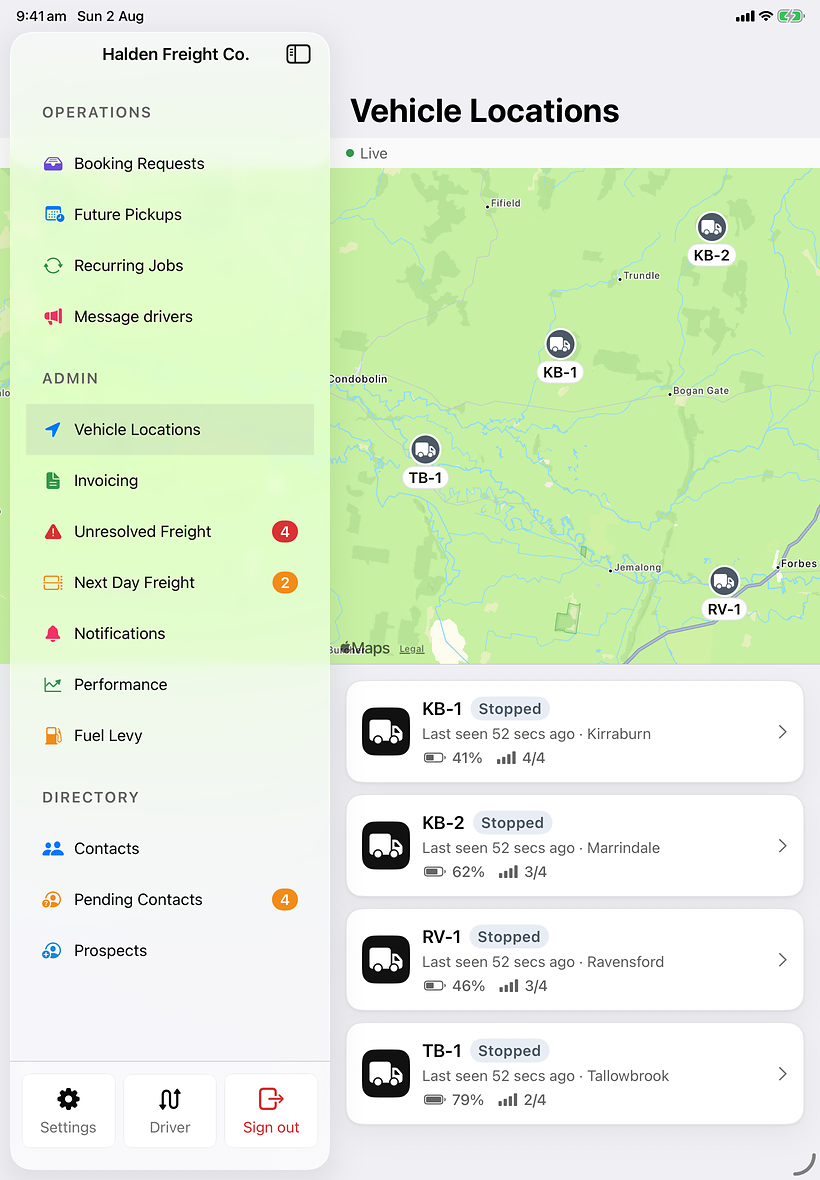
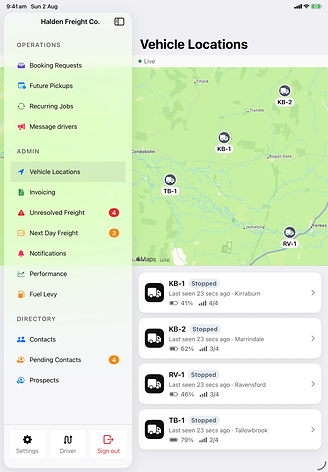
The map shows where each vehicle is right now. “Where are you?” stops being a question anyone has to ask.

The Nado admin sidebar open beside a live vehicle map, four vehicles pinned across the region with last-seen times, battery and signal for each.

Add the job. The driver already knows.

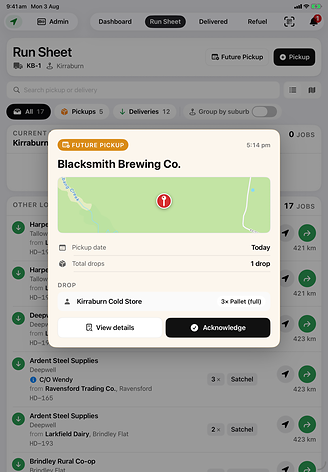
Create the pickup, assign the vehicle, and it lands on that run sheet in distance order — and the iPad in the cab says so. No second call to pass it on.

A driver’s run sheet on an iPad with a new future-pickup card on top, showing the customer, the pickup date and the drop, waiting to be acknowledged.

Bookings arrive as a list, not a call.

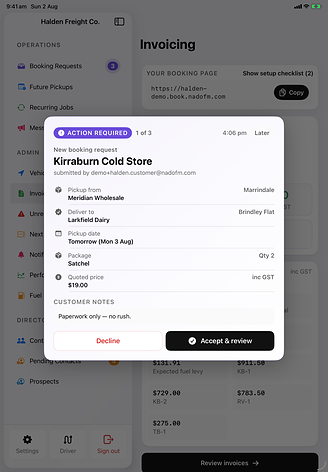
Customers send the job themselves, with the addresses, the freight and the date already filled in. Accept it, put it on a vehicle, and it’s on the run sheet.

A new customer booking request on an iPad, showing pickup and delivery contacts, date, package, quoted price and the accept or decline choice.

Invoicing. Done.

Two steps. Review, submit.

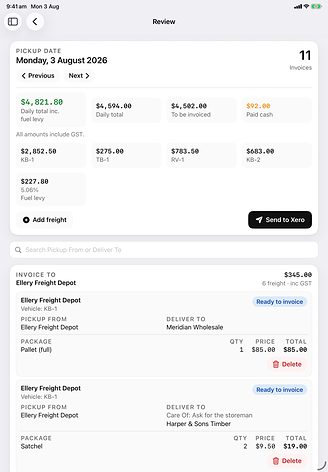
Every job already priced — it was written the moment it was created, not at the end of the week. Open the day, check it, submit it.

Review the day.

Every job that went out, grouped by whoever’s paying for it, with the price already on it. Nothing to type in, nothing to look up on a rate card, nothing to reconcile against a pile of dockets.

The Nado invoicing review screen on an iPad: a day’s delivered jobs grouped by the customer being invoiced, each line showing package, quantity, price and total.

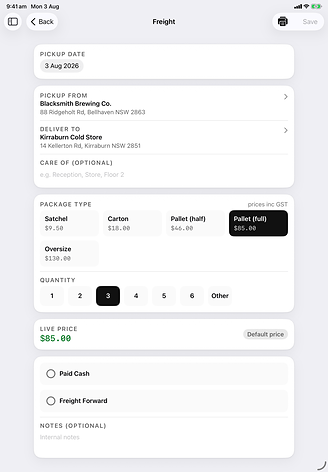
Change anything, in place.

Wrong quantity, wrong package, a price that was agreed on the phone? Tap it, change it, save it. The total moves with you. Nothing has to be corrected twice in two places.

Editing a freight line on an iPad: package type and quantity selected as tiles, the live price updating beneath them, and Save in the corner.

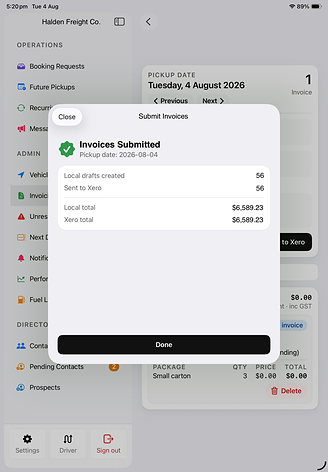
Submit.

That’s the second step. The day is invoiced and gone. No re-keying, no docket pile on the passenger seat, no Saturday morning at the kitchen table.

A confirmation on an iPad after submitting a day’s invoicing, showing the number of invoices created and the total value for that pickup date.

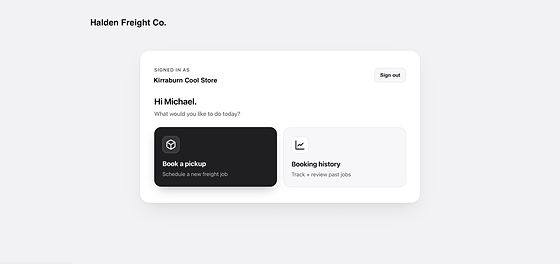
Your customers book themselves in.

A booking page in your own branding — with a custom domain on Pro, which we set up with you. Every booking lands in your dispatcher's inbox for one-tap accept.

  • Your logo, your colours, your name on the page
  • Same-day cutoffs you set per suburb
  • One-tap accept, and assign a vehicle
  • Full booking history per customer
A courier’s own branded booking page in a browser, with the customer signed in and offered a new pickup or their booking history.

One place, for everything.

Pricing engine + fuel levy

Package types, quantity discounts, per-customer rates, and a levy that follows the pump.

Your contacts, imported

Bring your customer list in, and approve the ones drivers add on the road.

Negotiated rates

Per-customer pricing and quantity breaks, applied automatically.

Set once, runs itself

Daily, weekly, fortnightly or monthly, on whichever days you pick. The job creates itself and lands on the run sheet.

Who did what, and when

A full audit log for the whole company, with the actor recorded even if that person later leaves.

Roles you set yourself

Decide which roles see which parts of the system. Owner and driver stay locked so you can't lock yourself out.

Proof at the door

Photos and a signature attached to the job, with the time and the place. “It never arrived” stops being an argument.

Set up in six steps

Branding, vehicles, package types, email, your first driver, payment. Guided on the iPad and on the desktop.

Checked before it moves

A pre-shift vehicle check on the iPad, logged and dated, before the first job of the day.

Scan and label

Barcode scanning, load mode, and labels to any AirPrint printer.

Talk to the fleet

Two-way chat with one driver or all of them, live on both the iPad and the desktop.

The bad day, handled

Unresolved freight, next-day carryover, transfer between vehicles, and a delivery you can undo.

Ready to get started?

Unlimited drivers on every plan. Cancel any time.

Mission

Where Nado started.

$49/mo

Billed monthly · cancel anytime

Get started
  • One vehicle, unlimited drivers
  • Driver run sheets + photo POD
  • CarPlay turn-by-turn navigation
  • Add Pickup wizard for walk-up jobs
  • Pricing engine + package types
  • Email support

Starter

For the first few trucks.

$349/mo

Billed monthly · cancel anytime

Get started
  • Up to 5 vehicles, unlimited drivers
  • Everything in Mission
  • Driver run sheets + photo POD
  • CarPlay turn-by-turn navigation
  • Add Pickup wizard for walk-up jobs
  • Pricing engine + package types
  • Email support

Pro

For larger operations.

$1499/mo

Billed monthly · cancel anytime

Get started
  • Up to 30 vehicles, unlimited drivers
  • Everything in Standard
  • Advanced roles & permissions — owner, dispatcher, accounts, viewer
  • Custom domain for your booking page
  • Priority support

Running a larger operation? Talk to us about Enterprise →
All prices AUD, GST included.

Getting started

Running by end of day.

No IT setup. No training day. No implementation fee.

10 min
Your account is ready.
Branding, vehicles, package types and your booking page — all set up by a guided six-step wizard. No onboarding call required.
1 hour
Drivers are connected.
We get your drivers onto the app and signed in, and they see their run sheet. CarPlay works the moment they plug in. No IT department needed.
Same day
First delivery dispatched.
Create a job, assign a vehicle, watch it move on the live map. When it's delivered, the invoice is ready to review and submit.

Try Nado on your own fleet.

No sales call. Sign up and dispatch your first job today.

Create your account →